
A client’s site worked flawlessly. Yet in Google it was showing hundreds of pages for a Japanese shop that never existed. It’s not a search-engine glitch or a typo in the address — it’s the classic Japanese keyword hack, one of the most common and most insidious WordPress attacks. Insidious because the site owner usually has no idea they’ve been hit. I recently cleaned up exactly such a case, and in this article I’ll show you how to spot it, why it can run hidden for months, and how to remove it completely — not just sweep it under the rug.
How the attack looked
The first sign wasn’t the site itself — it was Google. Running the site:domain.com query returned a list of pages nobody had ever published: hundreds of pages with Japanese titles and descriptions, dates from the past few days, and prices in yen.
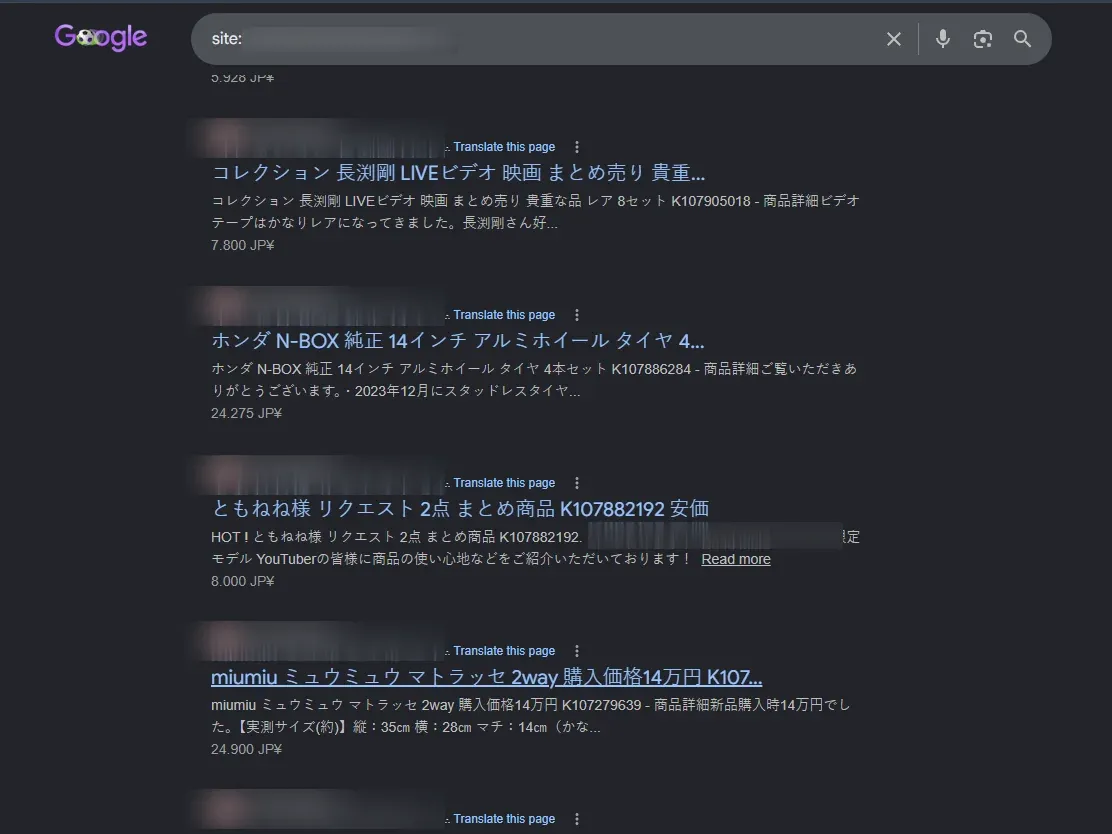
Click any result and you landed on a page that looked like a real shop — Japanese descriptions, photos of premium-brand handbags and watches, prices in yen, “add to cart” buttons. All planted under someone else’s trusted domain.
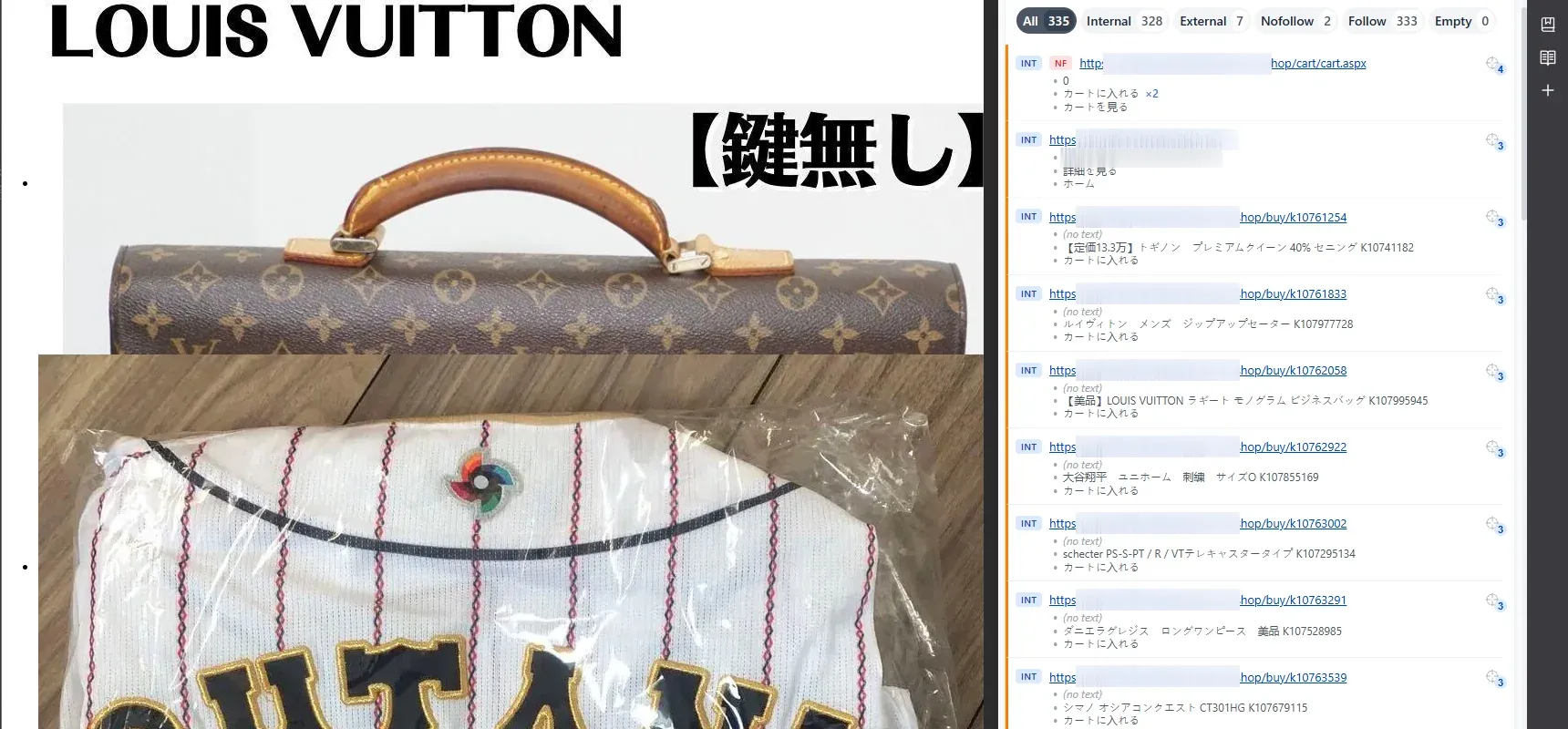
Cloaking — why the owner saw nothing
The most important part of this attack, and the reason it can stay undetected for months: visiting the site directly, the owner saw their normal content. Only arriving from Google or Bing search results served the Japanese version.
This is a technique called cloaking. The attacker’s script checks who is visiting and from where — it inspects the Referer header (did someone come from a search engine), the User-Agent (is it Googlebot), and sometimes whether the visitor is a logged-in admin. Based on that, it decides:
- The owner typing the address directly, or a logged-in admin → gets the original, clean page. Everything looks normal.
- Googlebot and users clicking through from search results → get the Japanese spam page.
The result is that the person running the site can open it every day and notice absolutely nothing. The attack lives only in the space between the search engine and the visitor coming from it — exactly where the owner never looks. Hence the iron rule: you don’t judge a site’s state by how it looks once you’re logged in, but by what Google sees. The site:yourdomain.com query is the first and fastest diagnostic.
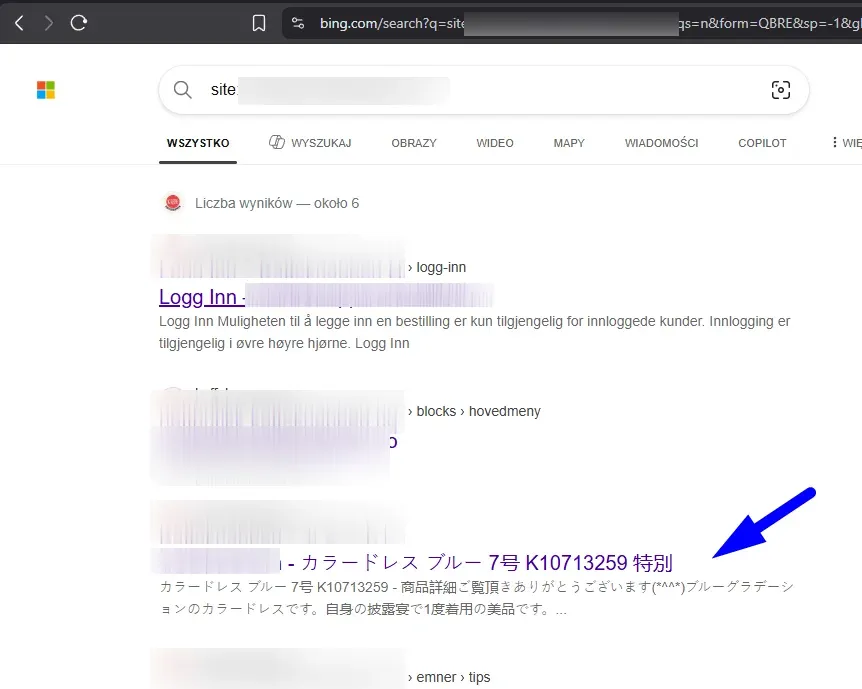
The attack wasn’t limited to Google, either. Below is the same case seen from Bing — in the index, alongside the real Norwegian shop pages (login, terms), sit the injected Japanese product pages. It shows the scale: the spam reached multiple search engines at once.
Why would anyone put Japanese spam on someone else’s site
The Japanese keyword hack isn’t about destroying the site or stealing data. It’s parasite SEO — feeding off someone else’s authority.
Building domain trust in Google takes years. The attacker doesn’t want to build it — they want to steal it. By planting thousands of pages under a well-rated, existing domain, they push their spam into the index with ready-made authority. Those pages rank for Japanese shopping queries, and the traffic is redirected to real (usually scam) shops or sold on. The victim pays with:
- lost rankings — Google downgrades the whole domain once it detects spam,
- a malware warning in results and in the browser,
- a burned domain reputation that takes months to rebuild.
Shops get hit especially hard. WooCommerce installs and other e-commerce platforms usually run more plugins (a bigger attack surface), and fake product pages blend into a real catalog — so the attack goes unnoticed longer. It’s no accident the spam mimics shop listings: prices, “add to cart” buttons, product cards.
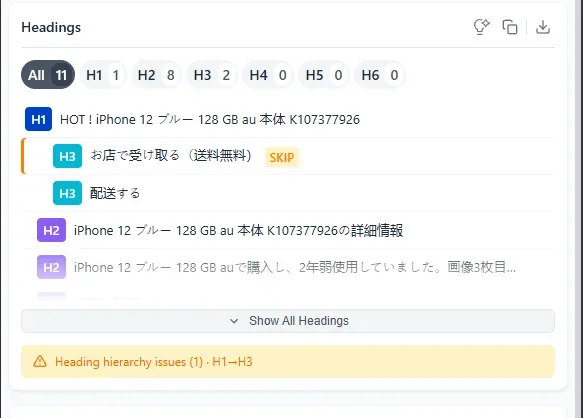
In the case I analyzed, some of the spam headings even revealed the content-generation mechanics — rigid “brand + model + buying keyword” templates in Japanese, repeated thousands of times.
The internal-link avalanche
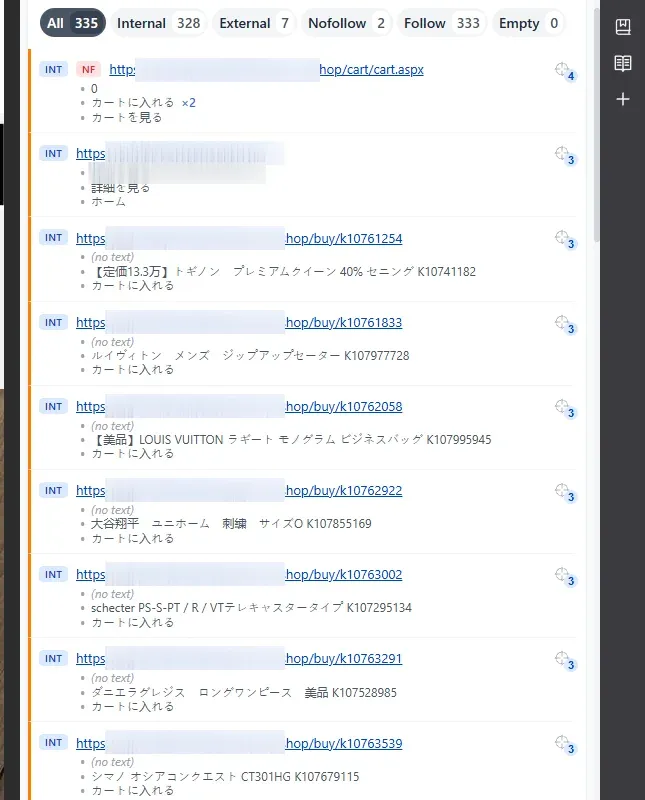
The second thing that jumps out on analysis is the scale of internal linking. A single spam page contained several hundred links to further pages of the same shop — in this case, a link audit (in the screenshot below, from my UPER tool) found 328 internal links on a single page.
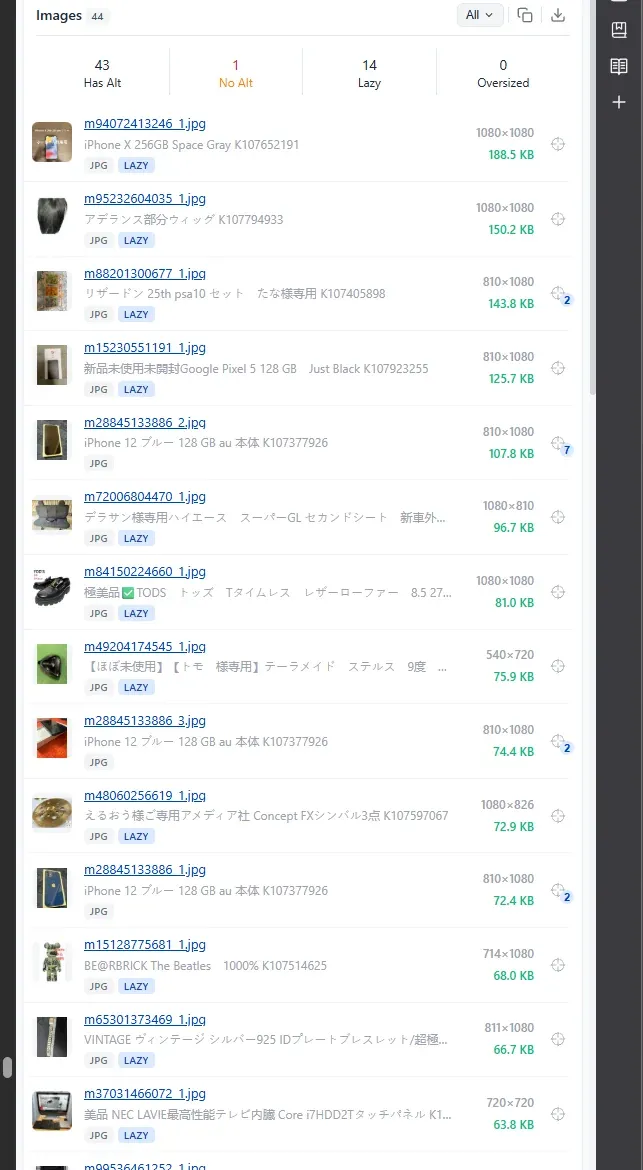
What’s more, practically every image was a link. The product photos were hotlinked from an external CDN — the attacker didn’t even host them on the compromised server — and each Japanese-listing thumbnail was at the same time a link to the next WordPress page. It’s deliberate: a dense web of cross-links means Googlebot quickly discovers and indexes whole thousands of spam URLs instead of getting stuck on one page.
Before we move on to detection — here’s the whole mechanism in five steps:
- Step 1
Break-in
An outdated plugin, a weak password, or a pirated theme with injected code.
- Step 2
Backdoor + rogue admin
A hidden PHP file and a new account — so they return even after a password reset.
- Step 3
Spam + sitemap
Thousands of Japanese pages and a planted, hidden sitemap submitted to Google.
- Step 4
Cloaking
Googlebot gets the Japanese spam, the owner sees a clean site. The attack stays hidden.
- Step 5
Damage
Ranking drop, malware warnings, stolen domain authority.
How to tell it’s this attack
Before you clean anything, confirm the diagnosis. Signs of the Japanese keyword hack:
site:yourdomain.com in Google.htaccess and wp-config.phpGoogle Search Console will tell you the most. If you don’t have access to it — that’s the first step to take before anything else. It shows the real, “Googlebot” version of the site that cloaking can’t hide.
The most common cleanup mistake — the hidden sitemap
Cleaning the Japanese spam single-handedly is where most people get stuck. They delete the Japanese pages, remove suspicious files, the site looks clean — and a few days later the spam is back, or Google keeps indexing hundreds of Japanese URLs even though none of those pages exist anymore.
Just fixing .htaccess and updating plugins usually helps only briefly — within days or weeks the site gets reinfected. Until you clean the server completely, the attack returns, because the malicious PHP scripts tend to be buried deep in the directory structure: in wp-content/uploads subfolders, in files masquerading as theme or plugin components, sometimes in several copies at once. One overlooked line is enough for the backdoor to recreate everything else.
You also have to think about neighboring sites. If you keep several sites on one hosting account and open_basedir isn’t set correctly (it doesn’t isolate the directories from each other), an infection on one usually spreads to all the others. Classic scenario: WordPress sits in the /blog/ directory, and next to it — a Magento or PrestaShop store. The vulnerable WordPress then becomes the way into the store, even though the store itself was up to date and well secured. That’s why, both when cleaning and when planning what goes where, you have to look at the whole hosting account, not a single site.
The reason, brilliantly documented by Sucuri: a swapped, hidden sitemap. The attack often leaves its own sitemap file (e.g. a sitemap.xml pointing to spam URLs, or an extra wp-sitemap-xxxx.xml) and submits it to Google. Even after you remove every spam page, Google keeps the addresses from that sitemap queued for indexing. Until you find and delete it, you’re tilting at windmills.
That’s why cleaning this attack is not about deleting the visible pages. It’s about removing the whole mechanism:
- The backdoor — a PHP file that lets the attacker back in (often hidden in
wp-content/uploads, posing as a system file name). - The rogue admin account — added to keep access even after a password change.
- The
.htaccessentries — responsible for the cloaking and redirects. - Injected code in
wp-config.phpand theme files. - The malicious sitemap and every file that generates it.
How to remove the attack step by step
A short, proven removal flow:
- Back up everything (files + database) before touching anything — it’s evidence and a safety net.
- Map the scope in Google Search Console — how many URLs, what patterns, since when.
- Remove the rogue accounts and reset passwords for everyone else.
- Clean the files — compare the install against a clean WordPress, remove backdoors, restore the original
.htaccessandwp-config.php. A scanner (e.g. Wordfence) helps, but doesn’t replace a manual review. - Clean the database of spam entries and options added by the attack.
- Find and remove the malicious sitemap, and resubmit the correct one in GSC.
- Update everything — core, theme, all plugins. Delete the unused ones.
- Request a review from Google in the “Security Issues” report.
If at any step you’re not sure whether a file is part of WordPress or a backdoor — that’s the moment to hand it to someone who’s done this before. A missed backdoor means you start over in a week.
And if you don’t have a current backup or the site in a repository (Git)? Then manual cleanup is a gamble — you never have full certainty you caught every backdoor, because there’s no clean reference to compare against. In that case the most effective option is often to rebuild the site from scratch: a fresh install, secured from minute one, with as few external plugins as possible — all on current versions. It sounds drastic, but it’s usually faster and more reliable than hunting down individual infected files in an install you can’t compare against anything.
How to protect yourself going forward
First, the bigger picture: WordPress powers over 40% of all websites, and that very popularity makes it the most-attacked system. Bots automatically scan thousands of sites at once looking for known vulnerabilities in popular plugins — you don’t have to be an “interesting target”, it’s enough to have one outdated, vulnerable add-on. You can see the scale in public vulnerability databases — Patchstack, Wordfence Intelligence, or WPScan — where new entries about SQL injection, XSS, or authentication bypass in specific plugins appear almost daily. It doesn’t mean WordPress is bad; it’s just that the more people use something, the more it pays to attack it.
The attack itself almost always comes in through an outdated plugin or theme with a publicly known vulnerability, a weak password, or a pirated premium theme with injected code. WordPress itself is secure — the hole is usually one neglected add-on.
- Outdated plugins & themes Publicly known vulnerabilities nobody patched.
- Vulnerabilities: SQL injection, XSS Flaws in plugin code, mass-scanned by bots.
- Weak passwords, no 2FA Dictionary and brute-force attacks on the login.
- Nulled (pirated) themes Premium builds from shady sources, often with a backdoor.
- Supply-chain attack A hijacked but "official", up-to-date plugin version.
- Abandoned installs Sites with no updates, backups, or monitoring.
Minimum hygiene:
- Update core, theme, and plugins as soon as patches ship.
- Limit the number of plugins — each one is a potential attack vector.
- Strong passwords + 2FA for every account with dashboard access.
- Don’t install themes and plugins from unofficial sources (“free” premium versions).
- Monitor the site and its links — Google Search Console and Bing Webmaster Tools (both free), plus a backlink tool like Ahrefs for the link profile. They’re the first to flag a sudden spike in indexed pages or spam hidden by cloaking.
- Regular backups kept off the site’s server.
One caveat to “update everything”: being up to date doesn’t guarantee security. Sometimes the backdoor ships in the official, latest version of a plugin — when someone hijacks the author’s account and injects malicious code into the package in the repository (a supply-chain attack). That’s why fewer plugins and more trusted sources mean less risk — and it’s worth rolling out updates with a short delay, after checking what a given version actually changes.
For the same reason, turning on “enable auto-updates” for every plugin isn’t always a good idea. It conveniently patches known holes, but it can also pull a hijacked version in the middle of the night before anyone catches it — exactly the scenario where the auto-update itself lets a backdoor onto the server. A sensible compromise: auto-update core and critical security patches, but keep manual, deliberate control over the plugins you trust least.
For a full, practical WordPress hardening checklist, see the official documentation: Hardening WordPress.
It’s also worth asking yourself a more honest question: does this site even need to be on WordPress? If it’s a brochure or company site that rarely changes, the whole attack surface — plugins, dashboard, PHP, database — is needless risk. A static site built on a modern stack (like the one spoko.space runs on) has no login panel and no database to take over, so this particular attack is physically impossible on it. I lay out the security and maintenance differences in my static site vs web application comparison, but it’s worth keeping in mind the next time you face “I got hacked again”.
Summary
Japanese SEO spam is dangerous precisely because it’s quiet. Cloaking makes the owner see a clean site while Google indexes thousands of Japanese pages and downgrades the whole domain. The key to cleaning it effectively is understanding that the visible pages are a symptom, not the disease — you have to remove the backdoor, the rogue account, the .htaccess entries, and the hidden sitemap, or the spam comes back. And the best defense is still prevention: updates, fewer plugins, strong passwords, and regularly checking Google Search Console — because it, not your browser, sees the truth about your site’s state.