AI has changed how I write E2E tests — but not in the way you might expect. It is not about “AI writes all the tests for me”. It is about removing friction from specific, repetitive tasks: generating scenarios, analysing failures, producing boilerplate. When AI handles those, I have more time for what actually requires thinking — test architecture, selector strategy, coverage decisions.
This is a practical guide: where AI genuinely helps, where it does not, how to integrate it into a Playwright project, and what to realistically expect from it.
Where AI actually makes sense — and where it does not
Before the details, a realistic map:
AI accelerates work. It does not replace thinking.
Architecture: AI as a layer in the quality loop
The diagram below shows how AI fits into a standard E2E pipeline — not as a replacement, but as two additional layers: before implementation (generating scenarios) and after execution (analysing failures).
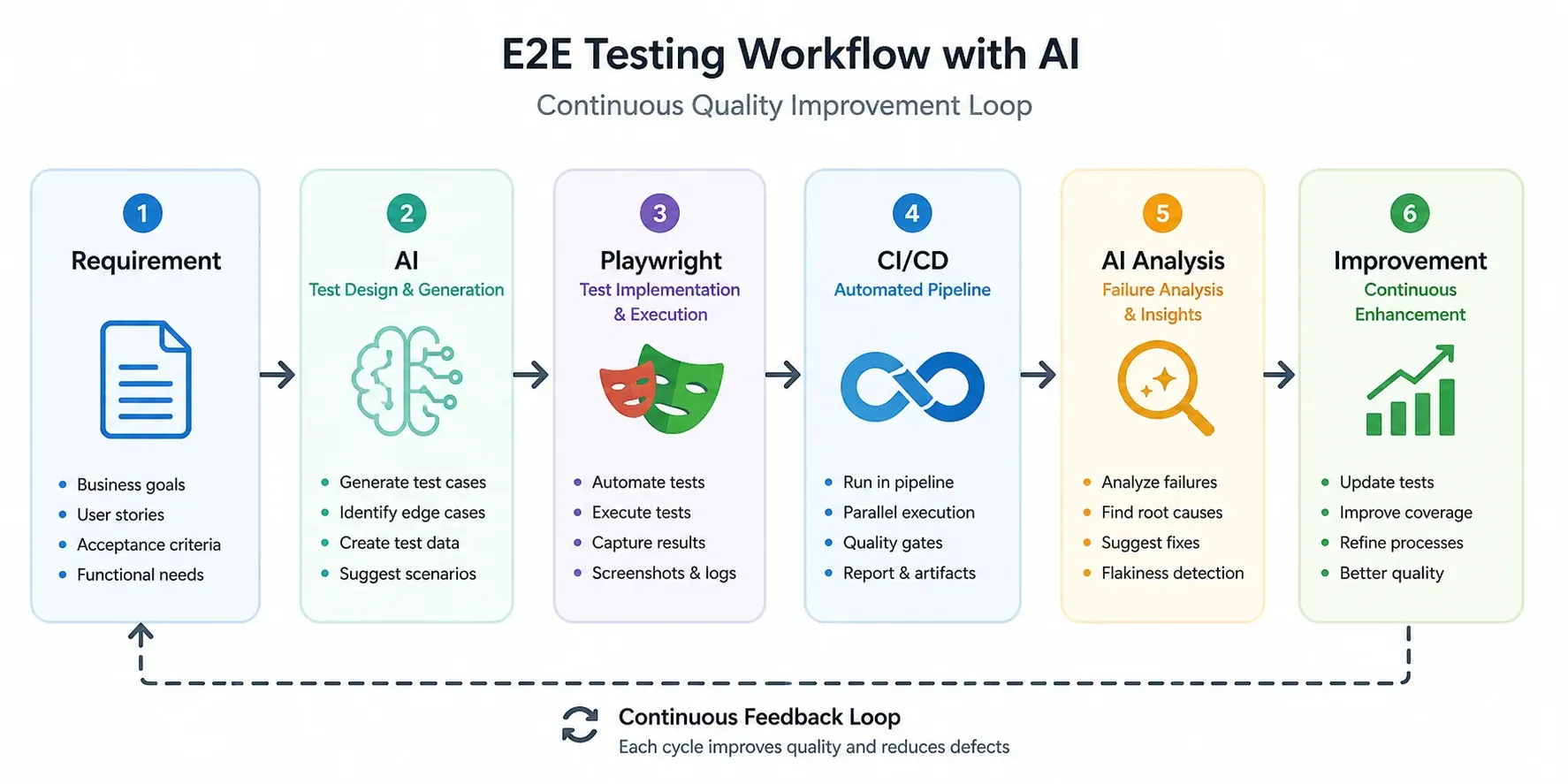
The key point: AI appears twice. Once at the start (scenario design), once at the end (results analysis). Playwright and CI/CD stay unchanged — AI wraps them, does not replace them.
The same loop applies beyond tests. For a full project built this way — and the review findings that only a human second look caught — see how I built a recipe-archiving PWA with AI.
Selector strategy — the foundation of stable tests
80% of E2E test problems are selectors. Brittle, CSS-based, DOM-structure-dependent selectors that break with every redesign. Before generating tests with AI, establish selector rules — because without instructions, AI defaults to bad ones.
Selector hierarchy
getByRole is preferred not just for stability — it also tests application accessibility. If getByRole('button', { name: 'Log in' }) does not work, the button is probably not accessible to screen readers.
Vue and Astro specifics
In Vue components with dynamic rendering and in Astro components with client-side hydration, CSS selectors are particularly fragile. The data-testid contract is the right approach:
<!-- Vue -->
<button data-testid="login-submit" @click="handleLogin">
  Log in
</button>

<!-- Astro (client:load) -->
<SearchForm client:load data-testid="search-form" />
Rule: test behaviour, not DOM structure. data-testid is the contract between test and component — changing styles or internal structure does not break the test.
Examples in practice
Filament/Livewire admin: semantic selectors + hydration waits
A test from a Laravel admin panel I maintain (Filament v5 + Livewire). It exercises conditional UI: the “sale value” field should appear only when shop status is set to sold.
// e2e/shop-status.spec.ts
test('should show sale value field only when status is sold', async ({ page }) => {
  await page.goto('/admin/products');
  await page.locator('a[href*="/admin/products/"][href*="/edit"]').first().click();
  await page.waitForURL('**/admin/products/**/edit');

  const forSaleToggle = page.getByRole('switch', { name: 'Na sprzedaż' });
  const shopStatus = page.getByLabel('Status w sklepie');

  // Re-toggle "for sale" so Livewire re-renders the "online sale" section
  if ((await forSaleToggle.getAttribute('aria-checked')) === 'true') {
    await forSaleToggle.click();
    await expect(shopStatus).not.toBeVisible(); // auto-wait until Livewire hides it
  }
  await forSaleToggle.click();
  await expect(shopStatus).toBeVisible({ timeout: 15000 });

  // 'available' → sale value field is hidden
  await shopStatus.selectOption('available');
  const saleValue = page.getByRole('spinbutton', { name: 'Kwota sprzedaży (PLN)' });
  await expect(saleValue).not.toBeVisible();

  // 'sold' → sale value field appears
  await shopStatus.selectOption('sold');
  await expect(saleValue).toBeVisible();
});
What this shows in practice:
- Every assertion target is semantic —
getByRole('switch'),getByLabel,getByRole('spinbutton'). The only CSS locator is the entry-point link (a[href*="/edit"]), not anything we assert against. - One test, both states — flipping the dropdown between
availableandsoldcovers the conditional UI in a single round-trip. No separate fixture per state. - Web-first assertions handle hydration timing — zero
waitForTimeout.expect(shopStatus).not.toBeVisible()andexpect(shopStatus).toBeVisible({ timeout: 15000 })auto-retry until Livewire re-renders. AI without context typically reaches forwaitForTimeout(1000)after every interaction (“just in case”) — Playwright docs flag that as DISCOURAGED and it’s how flaky suites are born. getAttribute('aria-checked')for switches —locator.isChecked()only works on<input type="checkbox|radio">and throws onrole="switch". Readingaria-checkeddirectly is the current correct pattern.
Astro hydration: data-testid for components without a stable role
When a component is hydrated client-side (Astro client:load, Vue, React) and the boundary you want to scope to has no obvious semantic role, data-testid is the contract. The pattern:
<!-- SearchForm.astro -->
<SearchForm client:load data-testid="search-form" />// e2e/search.spec.ts
test('search returns results for a known query', async ({ page }) => {
await page.goto('/');
const form = page.getByTestId('search-form');
await form.getByRole('searchbox').fill('astro');
await form.getByRole('button', { name: 'Search' }).click();
const results = page.getByTestId('search-results');
await expect(results).toBeVisible();
await expect(results.getByRole('article').first()).toBeVisible();
});Two things to note:
data-testidscopes,getByRoleasserts. The test ID identifies the hydrated boundary; the actual interactions (searchbox,button,article) still use semantic roles. AI without this nuance tends to slapdata-testidon every element — that is its own anti-pattern.- The test ID lives on the component, not its children. One
data-testid="search-form"is enough — you don’t needsearch-input,search-submit,search-erroretc. unless an element genuinely has no semantic role.
Prompts that actually work
AI output quality is directly proportional to prompt quality. Here are the patterns I use.
Generating test scenarios
You are a QA engineer. Generate E2E test scenarios for: [feature description].

Include:
- positive path (happy path)
- negative scenarios (invalid data, insufficient permissions)
- edge cases (empty fields, very long values, special characters)
- security cases (if applicable)

Format: bulleted list. Each scenario: what the user does → what the system should return.
Generating Playwright code
Write a Playwright TypeScript test for this scenario: [scenario].

Strict rules:
- use getByRole or data-testid, never CSS selectors
- every action must have an assertion (expect)
- Page Object pattern — logic in the class, not the test
- comments only where intent is non-obvious
Debugging a failure
Analyse this Playwright failure. Provide:
1. Most likely root cause
2. Concrete fix
3. Confidence (0–100%)

Error: [stack trace]
Test code: [code excerpt]
MCP — from chat to engineering tool
MCP (Model Context Protocol) is a specification that lets language models interact directly with tools. For Playwright the practical effect is concrete: instead of generating code for you to copy, AI drives a live browser session, reads its runtime state, and reasons about the gap between what the test expected and what the page actually did.
Without MCP: AI = advanced autocomplete. You copy the code, run it, copy the failure back, paste it, iterate manually.
With MCP: AI opens the browser, reproduces the steps, pulls console output and network responses, and proposes a fix in the same loop.
Playwright MCP — what’s actually in the box
microsoft/playwright-mcp gives Claude Code (or any MCP client) tools to drive a browser and inspect its state. The ones I use most:
browser_console_messages— full console output (including errors) since page load, filterable by level. The single most useful tool when a page silently fails on a JS error.browser_network_requests— every network call the page made.browser_network_requestreturns full headers and body for a specific one — handy for “the form submit returns 422, what’s actually in the response”.browser_snapshot— accessibility tree as structured text. The README explicitly recommends this over screenshots for the LLM — structured data beats pixels for reasoning.browser_take_screenshot— pixel screenshot when visual context is genuinely needed (layout, contrast, z-index).browser_route,browser_network_state_set— mock requests or toggle offline, useful for testing error states.
Delivery model: pull, not push. The server does not stream events into the model’s context — Claude has to call browser_console_messages (or any other tool) after the action it wants telemetry for. Typical debug loop: navigate → click → ask for console + network + snapshot → reason about the diff.
Where this actually pays off
Two scenarios where MCP changes the workflow:
- Validating E2E failures. A test fails with
TimeoutError: waiting for locator. Without MCP I paste the stack trace and guess. With MCP, Claude navigates to the same URL, callsbrowser_console_messages(often a runtime JS error blocking hydration), grabsbrowser_snapshot(to see the actual role tree), and points at the real cause — usually within seconds of the failing line. The console log alone is what’s missing from a stack-trace-only debugging session. - Verifying component behaviour live. Especially useful for Vue / Astro
client:loadcomponents where hydration timing or a missing prop produces a silently broken UI. Claude can open the page, interact with the component, read what the console says, and report whether the component rendered, errored, or hydrated half-way. Faster thanconsole.log-driven debugging, and the AI sees the same runtime state I would.
A boundary worth knowing: playwright-mcp controls a live browser, it does not run your *.spec.ts files. For executing the suite you still use npx playwright test. The MCP earns its keep on reproducing and diagnosing, not on driving the test runner.
Setup is one entry in .mcp.json at the project root (or in claude_desktop_config.json for Claude Desktop):
{
  "mcpServers": {
    "playwright": {
      "command": "npx",
      "args": ["@playwright/mcp@latest"]
    }
  }
}
Debugging with AI: 30 minutes → 5 minutes
Debugging is where the ROI is most tangible. A typical pattern:
- Test fails with
TimeoutError: waiting for locator - I paste into Claude: stack trace + test code + description of what it tests
- AI identifies: selector is correct, but element appears only after an animation — missing
waitFor - Fix: one line
Without AI: 20–30 minutes studying the stack trace, checking the selector in DevTools, working out why the element is not available. With AI: 3–5 minutes assembling context and evaluating the suggestion.
Key caveat: AI without context produces generic answers. Stack trace + code + environment description — that is the minimum to get a useful diagnosis.
Real numbers: how much time AI saves
Indicative figures from my projects. Range depends on application complexity and prompt quality. Key caveat: AI does not accelerate test architecture or coverage decisions — time there stays the same.
Anti-patterns I avoid
Copying without validation — AI generates plausible-looking code that can have subtle logic errors. I always read the code before running it.
Blindly trusting selectors — by default AI generates CSS selectors because they are easy. This needs to be enforced in the prompt.
No architecture — generating tests directly without Page Object pattern gives a fast start and pain during refactoring.
Over-engineering with MCP — for a small project with a handful of tests, MCP is overhead. I start with copy-paste, introduce MCP when the project grows.
Summary
E2E testing in 2026 is not just Playwright code — it is a system where AI handles the repetitive work and the engineer focuses on what requires judgement.
Concrete steps to start:
- Start with debugging — paste a failure into Claude with context. Immediate ROI, zero configuration.
- Establish selector rules —
getByRole → data-testid → id, CSS only as a last resort. Build this into your prompt. - Generate test cases, not code — AI as a scenario brainstorm, you as the quality filter and implementer.
- MCP when the project grows — Playwright MCP integration makes sense with regular debugging cycles.
If you need to explain to a client or a manager why any of this matters, without a word about selectors, I wrote a separate piece: what a business owner gets from automated tests.
Building an application in Astro, Vue 3 or another modern stack and want to talk about testing strategy? Get in touch.