At a glance
An admin panel knows about things someone should see soon: a new inquiry, a stuck order, a production error, a finished build. In Filament they land in the bell in the corner of the panel — and you only see the bell after logging in.
It is an open-source project under the MIT licence — the code is public on GitHub. Below: what it does and, above all, how it is built.
Why the bell alone isn’t enough
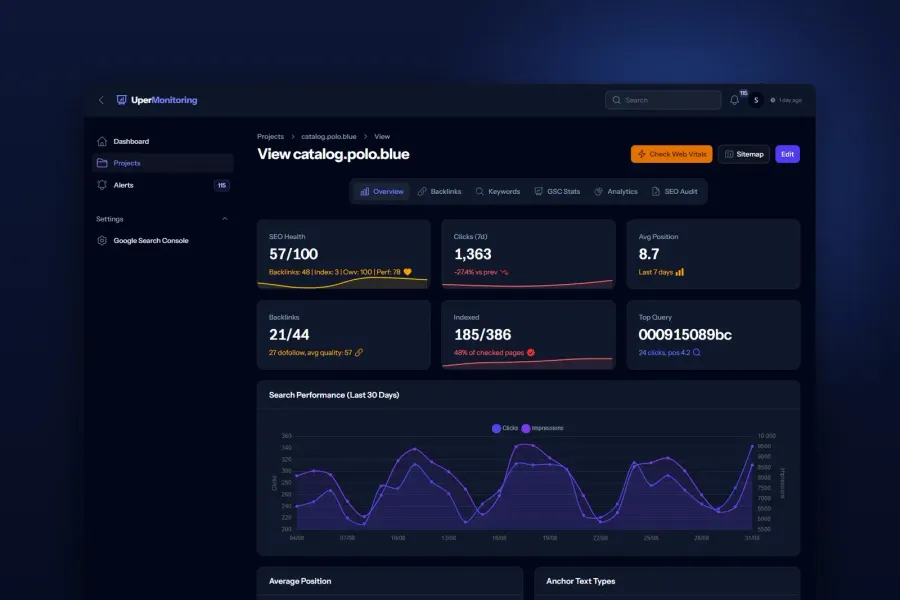
The bell has one more problem. When a lot is happening in the app, it fills with dozens of notifications — 117 here, most of them routine (media conversions, generated covers) — and the ones that truly matter drown in them. So the important events also go to the phone, into separate topics:


It was never about sending a message
It is easy to think this is a simple integration: take an event, POST it to the Telegram API. But the problem is not the Telegram API itself — it is reliable message delivery in a live application. Telegram rate-limits you. The cache goes down. One request generates the same notification for ten recipients. Production can spit out a burst of errors in seconds.
So Ops Notify is not “sending to Telegram” but a delivery layer for operational events: a queue, deduplication, retries, routing and a history. The rest of this write-up is about those decisions.
Two paths: existing notifications and new events
Existing notifications — no code changes. The plugin sits on top of Laravel’s notifications, not beside them. Notifications Filament sends to the bell through sendToDatabase() are forwarded to Telegram too — without a line of code. And existing Laravel notifications — mail and other channels — can be mirrored to Telegram without touching them: you enable forwarding in config and list the channels, and the plugin builds the message from what the notification already defines (toMail, toArray).

New operational events — an explicit API. Events the panel does not know about on its own — a build, a deploy, an external webhook — you send with the fluent OpsMessage API:
use Spokospace\OpsNotify\OpsMessage;

OpsMessage::make('build.completed')
    ->success()
    ->title('Frontend build completed')
    ->field('Duration', '4m 12s')
    ->button('Open site', 'https://shop.example')
    ->send();
One screen shows the whole message: the event, its semantics (success), the fields, the button and the send. This is an API, not a one-off integration.

What happens when production starts to fall over
This is where the project spent the most time in production. Three problems had to be solved for the notifications to actually arrive:
429 and backoff
Telegram rate-limits sending, so “send it, and if it fails try again” is not enough. Delivery respects 429, waits as long as Telegram asks, and retries with backoff — and it does so on the queue, so it never blocks the request that triggered the notification. A notification is a side effect, not something entitled to overturn an order being saved.
Duplicates
Filament can generate the same notification separately for each admin. Deduplication (a shared cache) sends it to Telegram once, however many recipients there are — a team of ten does not get ten copies of the same alert. And when the cache goes down, deduplication steps aside and the message still goes, rather than failing the request with a 500.
A flood of identical errors
In an outage, two hundred identical events can fire in seconds. Instead of two hundred messages, a guard folds the burst into a single digest — so events at the window’s edge are neither dropped nor duplicated.
Notifications created inside a transaction are queued only after it commits (afterCommit), so the worker never reaches for data that isn’t in the database yet. On top of that, the things that only show up in production: a lock while discovering the chat, so concurrent processes don’t run the same scan, and accurate status reporting, so a message isn’t marked “queued” when it wasn’t actually queued.
Every message lands in a history with its status and the error Telegram returned, and failed ones can be resent with a single button. The Ops Notify page shows the connection and the state of the queue alongside it, so you can see not only what went out but whether it even has a way to go.


Routing: signal from noise
Delivery is only half of it. The other half is not drowning a person in everything at once. Telegram lets you split a group chat into forum topics, and the plugin makes that its organising axis: inquiries go to one topic, errors to another, builds to a third. Rules match events by pattern (inquiry.*, build.*), and Filament notifications by title.


The rest of the configuration lives in the panel, not in .env: the encrypted token, the chat id, templates, the bot profile and access based on Laravel gates. The panel is translated into 25 languages, and the message language is set separately — the chat is read by the whole team, so it doesn’t depend on any one admin’s panel language.
The path of a message
- Step 1
Something happens in the app
Filament sends a bell notification, or code calls the ops channel or OpsMessage. Same source, same path from there on.
- Step 2
A rule picks the topic
The event is matched by pattern (or by title, if it is a Filament notification) and assigned to the right forum topic.
- Step 3
A template composes the message
Title, fields and hashtag come from a template, with the service prefix and a button leading to the record.
- Step 4
The queue sends with retries
The message goes through the queue, aware of Telegram rate limits and retried — never blocking the request that produced it.
- Step 5
History records the outcome
The status and any Telegram error land in the history, and a failed send can be repeated with one button.
My role
Routing, a queue with retries, deduplication, the panel, the API, the history — everything above is mine. I am the author and maintainer of the package, from the event model to the delivery layer: the ops channel and the fluent OpsMessage API, the Telegram driver, routing and topics, failure-resistant queued delivery, the panel and the bot profile, the history with resend, the documentation, the tests and the translations.
Result
It runs in production — on my own panels and on client sites. The events that matter reach the phone, and failed sends show up in the history and can be resent with one button.
The plugin is listed in the official Filament plugin catalogue with a package health score of 100/100:

Tech
Laravel
The plugin sits on Laravel's notifications and its queue, so any app notification can reach Telegram the same way as the rest.
Filament 5
The panel: the Ops Notify page, settings, bot profile and history. Bell notifications are forwarded with no code change.
Telegram Bot API
The delivery channel. Forum topics organise the messages, and each one carries fields, a hashtag and a button to the record.
Queue and Horizon
Delivery is queued, retried and rate-limit aware, and the panel shows the queue and Horizon state.
PHP 8.3–8.5
At the time of writing: PHP 8.3–8.5, Laravel 12/13 and Filament 5, with tests running in CI.
Open source (MIT)
Public on GitHub, installed through Composer, with documentation and a panel translated into 25 languages.
When it makes sense
If a panel is where events show up that need a response outside working hours, or without constantly checking the panel, Telegram becomes an extra operational channel. The plugin doesn’t replace in-app notifications — it moves the ones that matter to where the team already reads its messages.
It exists because I needed it on my own panels — the same ones that run my custom CMS. And since the problem (“the notifications that matter don’t arrive in time”) belongs to anyone who runs an admin panel, there was no reason to keep the answer to myself. The code is on GitHub and in the official Filament plugin catalogue — MIT, composer require spokospace/filament-ops-notify.