The problem: a saved link is not a recipe
Recipes circulate as posts, reels and videos. The reflex is a bookmark or the platform’s own “Save” button, but both store a pointer, not the content. After a few months some of the saved links stop working: the author deletes a reel, a group disappears, a blog goes dark, a post turns private. The collection quietly becomes a list of 404s, and you find out when you actually want to cook from it.
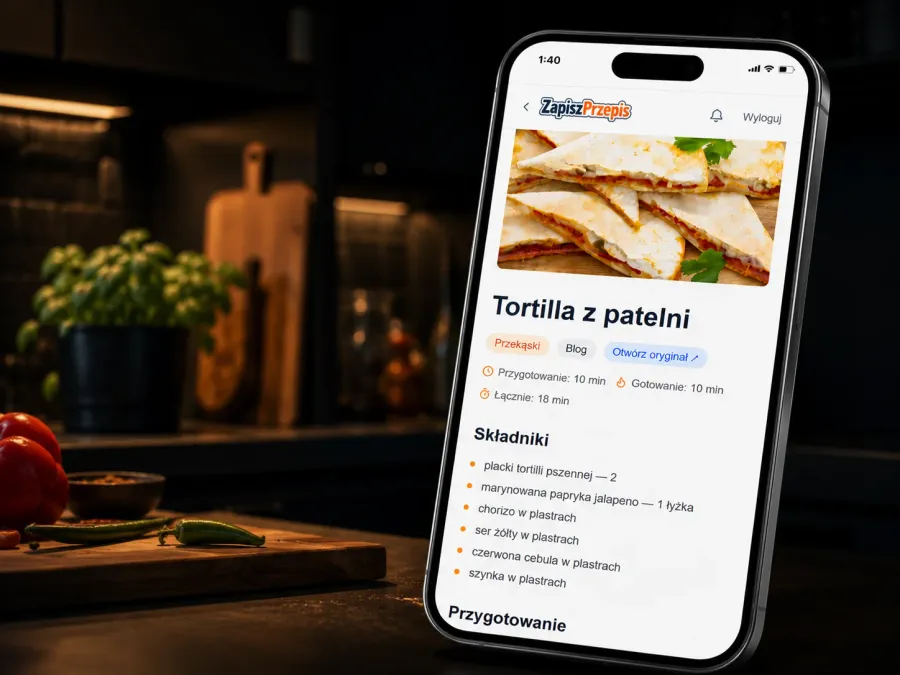
ZapiszPrzepis works the other way round, archive-first. A link becomes a permanent copy of the recipe in the database, and the source address stays next to it, so the original is one click away for as long as it lives.
I designed it for a non-technical person, someone who does not type ingredients by hand, fill in forms, or manage folders and tags. That constraint cut most of the “obvious” features and turned out to be the best filter in the project.
This is the sequel to my post on how I use AI on a real project. That one describes the method: specs before code, gates, tests. This one describes the product: what I built, how it works, and what changed since August, once people started using it.
From a private collection to a public base
The first version was one user’s private collection. The biggest change since August is the rebuild into a public recipe base.
- One link, one page. Every recipe has a public address,
/przepis/{slug}. Adding a link that is already in the database creates no duplicate; it adds the existing recipe to your favourites. Merged duplicates redirect (301) to the recipe that stayed. - Guests read without an account. The home page, recipes, categories and search are open. Guest access to the data goes through views that reveal nothing by default, so a permissions mistake ends in missing data, not in a leak.
- An account gives a collection of your own. Favourites, “My recipes” and a public profile at
/u/{name}. Adding recipes from links is behind an access code. - Several versions of the same dish. Recipes for the same dish are grouped (“We have 2 more recipes for krokiety”), and differences in ingredients are colour-coded. Similar recipes do not push meat dishes at someone viewing a meatless one.

How it works
The entry path is one gesture. The app registers as a Web Share Target, so it shows up on the system share sheet next to Messenger and WhatsApp. The user sends it a link and does nothing else.
- Step 1
Source detection
A Facebook post, a reel, a YouTube video and a blog are four different cases, each with its own way of fetching the content.
- Step 2
Duplicate check
The same recipe published twice does not enter the database twice, even under a different address.
- Step 3
Content retrieval
Several routes and fallbacks for when the first one fails.
- Step 4
Editing
A model pulls the recipe out and tidies it by fixed rules.
- Step 5
Check
With no ingredients or no steps nothing is saved, and a notification says the page has no recipe.
- Step 6
Labelling
A second, stronger pass fixes the title form, adds tags and a description.
- Step 7
Storage
The recipe lands in the database, and the photo in the app's own storage.
Extraction takes a dozen seconds and is occasionally flaky, so it does not run inside the request cycle. The app emits an event to Inngest, which queues the job and retries it on failure. The user gets an immediate response and the recipe appears shortly afterwards. If an import fails, the reason lands in the notifications and can be retried from there. An import stuck in “pending” is treated as failed, so nothing hangs forever.
Editing: from a post to a recipe
Saving the text is not enough. A Facebook post is usually narration (“I chopped, I sweated the onion, I added…”), full of asides and encouragement. A recipe in the app should look the same whatever the source, so the editing rules are part of the product.
- Steps are short instructions in the infinitive: “Pokroić mięso w kostkę.”, “Zeszklić cebulę.”. Narration and imperatives are rewritten into that form, and asides like “in my kitchen” and filler like “next”, “then”, “finally” are dropped, because the steps are numbered. Words that say when (“once the water boils”) stay. Recipes saved earlier are fixed by a separate script (in release 0.2.0 it covered 609 of them), and new ones get this form straight away.
- Order is fixed only where it has to be. A component the source prepares after the step that uses it (icing, crumble, sauce) moves before that step. A closing “Enjoy!” is dropped, and tips about storing and variants go into one last step, “Opcjonalnie:”.
- Nothing is added. When a post lists ingredients and leaves the method to its video, the steps stay empty. A time the source does not give can be estimated, but then it is marked as an estimate. The number of servings is never estimated.
- Foreign-language sources. A recipe from an English site gets Polish product names (pasta shapes as “literki”, “kółka”, “małe rurki”) and Polish phrasing without calques, and US labels like “94% lean” are simplified to “lean”. US measures are converted to metric.
- Household measures. When the source gives a kitchen measure next to the weight (“250 g flour – about 1.5 cups”), I show it as a second, lighter line under the amount. The model copies it verbatim from the source and never estimates it. For basic dry staples the app derives the household measure itself, from a density table, at display time only.
- Other tidying: a title as a menu would write it (no “How to make…”, no “best”, no first person), ingredient sections (Dough, Cream, Filling), US units converted to metric, a category by rules (cookies, cakes, bread, syrups and more).
Two passes are a deliberate cost split. A cheaper model extracts the content, and a stronger one, which receives one finished recipe, sets the labels and tags. The cheaper one tagged bread rolls and pizza as “shortcrust”. I pick the extraction model on my own tests, not from a ranking: after a test on recipes I moved to gpt-5.4-mini, and a wider test of 21 models on Polish and English recipes confirmed the choice (the top tier is a statistical tie).
How I chose the model: a test of 21 AI models on 50 Polish and English recipes, against a hand-checked reference, with the method and the results.
Sources and fallbacks
The first version read blogs and YouTube. Since then most of the work went into making a link simply work, because in practice sources fail in many different ways.
On top comes deduplication in several layers. The same link known under several addresses (a share from the Facebook app, a permanent post link, a group name in another form) gets one key. A repost by the same author is caught by a fingerprint of their text before any model is called, and one with slightly different text by an almost identical set of ingredients (even when two saves arrive almost simultaneously).
Photos and sources on cards
A recipe’s photo is a problem of its own. The first image on a page is often a logo, an ad or a thumbnail of another recipe.
- Cover and gallery chosen from the content. I reject photos from ad sections, related posts and comments, buttons, shop logos, video stills and images that are a link to another page. For blogs with a bad
og:imageI pick the right photo myself. - A copy of the photos at home. The cover and gallery are archived in the app’s storage, because Facebook addresses expire within days. Covers from hosts with broken SSL, or ones that refuse Cloudflare traffic, are recovered another way.
- Step photos. When the source has a photo for a particular step, it is shown at that step (for signed-in users).
- Where a recipe comes from. The source badge shows the Facebook logo and the author, or the blog’s domain. A private person appears only as a first name and a surname initial, because I never store a full name.
Everyday comfort


- Cooking mode. It shows one step per screen in large type, with a progress bar and Back and Next buttons, and the phone screen stays on while you cook (Wake Lock), because nobody wants to unlock a phone with flour on their hands. On the recipe page itself the ingredients have checkboxes: a ticked ingredient is struck through, and “Clear selections” resets the list.
- Search. One search with an “all / mine / favourites” scope, type-ahead suggestions, recent searches and voice (a “Powiedz” button and a “Słucham…” screen). Separately, a web recipe search that draws only on trusted sites and has a per-minute limit.
- Categories and tags. Categories with counts, and inside a category a multi-select of tags that narrow the list (a recipe must have all the selected ones).
- Favourites. A labelled heart on cards and on the photo, and a list of its own. A click by a signed-out visitor remembers the intent and completes it after sign-in.
- Printing. A “Drukuj” (print) button and a print stylesheet of its own: ingredients and steps in two columns, a small photo by the header, no source line and no step photos.
- Recipe of the day on the home page, which rolls over at Polish midnight, not at UTC midnight.
- Display settings. The text size scales the whole app, recipe description included. That page is reachable without signing in, because someone bothered by small print should be able to change it before logging in. There is also an accent colour picker.
Accessibility and a real phone
The app is meant to be readable for someone who dislikes small print, so the public rebuild went for WCAG 2.2 AA: large touch targets (48 px), no horizontal scrolling at 320 px width or with an enlarged system font, a “Back” button instead of getting lost in navigation. Category names do not break mid-word even at a large font, and one-letter conjunctions in Polish (“i”, “w”, “z”) do not stay at the end of a line.
I test on two Android phones, a Pixel 11 Pro and a Pixel 9, as an installed PWA rather than only in a browser window. That found bugs an emulator does not show: the colour of the system bar and the bottom navigation on Android, which could make buttons vanish against a white background. I fixed it with a dark manifest background and a runtime theme-color.
Visibility in search engines and for AI models
- Structured data. Recipe pages carry schema.org/Recipe in JSON-LD, so Google can show a recipe as a rich result.
- Descriptions. The description for search results is written when a recipe is saved, and categories have their own titles, descriptions and share cards.
- Sitemap and robots.txt. Search Console read the sitemap two days after it was submitted (status Success) and found 824 addresses in it. The pages appeared in Google’s index quickly.
- For language models. Every recipe and every category has a Markdown version, and an
llms.txtin the root lists the pages, so AI assistants can cite a recipe from its source rather than guess.
Sign-in and access
The base is a passwordless sign-in link by email that works on any device: a link opened in a different browser than the one where sign-in began no longer ends in an error. Google and Facebook sign-in have been added. The Facebook button waited until the Meta app went Live, and it has been switched on since 24 October. After the first sign-in the app asks once for a form of address, so it can greet the user in the Polish vocative and write “Dodała” or “Dodał” (added by, feminine or masculine) in public texts, rather than a stiff “Hello, User”.
Signing out on one device no longer signs out all of them, and a transient failure of the session check does not throw the user out.
Security and reliability
- Guest reads fail closed. Public pages read data through views with an allowlist of fields, and the edge of that list has its own tests.
- Photos through an allowlist. The image optimiser lets through only archived recipe photos, and addresses on private networks are rejected when fetching.
- Writes only through the server. Writing to the recipes table and to imports is taken away from the user’s session and left with the service role, so the lock is in the database, not only in the app’s code (after the code audit). The redirect after sign-in can no longer jump out of the site.
- Security headers set in the middleware layer on every response.
- A service worker without account pages. Offline mode shows saved public pages or an “Offline” message, but a signed-in user’s pages never enter the cache, and signing out clears it. Before, the fallback path did not work (it always took the first branch), so this was a real fix too.
- Backup and keep-alive. The recipe tables are dumped to R2 daily, and the Supabase project gets a daily query so it does not go to sleep.
- A production check. After a deploy a script checks that static files actually load and reports intermittent page errors.
Technologies
Hosting on Cloudflare Workers means no Node.js APIs at runtime, so every integration has to work over plain fetch. That ruled out several libraries before the first line of code.
Takeaways
- An archive of copies beats a bookmark, because the recipe does not depend on the source staying alive.
- The editing rules are the product, not an extra. They are what makes recipes from different sources read the same way.
- Sources fail quietly, so fallbacks, honest messages and notifications with a retry button earn their keep.
- One link, one page turned a private list into a base that can be read, linked to and found in Google.
- A real phone finds what a desktop browser does not.
How I got here, meaning specs before code, the agent pipeline, the code audit and the tests, is in the post on working with AI.